Syncing Kobo and Calibre Web
By hernil
Boy oh boy was this one a pain to get exactly right …
I’ll try to keep it brief for anyone stumbling upon this, but I might add more details later if I feel like it.
Premise
My wife has a Kobo that we’d (I’d?) like to keep synced to Calibre-web so we can have a common family library. Calibre-web supports this but ever since settings this up some months ago it has been – ahem – unstable.
In retrospect some calls have simply not been working as expected and for some reason the Kobo hasn’t been too happy with what it percieved as a broken API implementation when syncing itself (imagine that …). It’s also worth noting that syncing of books from Calibre actually worked fine, it was Kobo store specific actions like syncing books from Libby that was broken.
Calibre-web is following the rest of my homelab pattern as running in a Docker container and traffic being proxied in through Traefik. Traefik is configured to force all traffic to https.
The solution
There’s mixed messaging out there regarding ports, http vs https and so on with this kind of setup but here is what finally worked for me.
Note that I’m running the
nightlyversion of thelinuxserver.iocalibre-webimage at the time of writing as that contained another fix for something kobo-sync related that I can’t even remember right now.
Crucially all three settings need to be set correctly for this to work.
Calibre-web
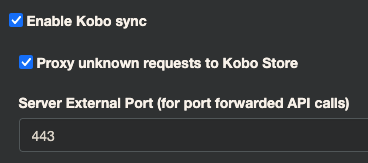
In calibre-web the Server External Port (for port forwarded API calls) setting needs to be set to 443 (aka, the https port).
Kobo
The .kobo/Kobo/Kobo eReader.conf file on your Kobo needs to be configured with the following line:
api_endpoint=https://your-calibre-instance.domain.com/kobo/your-calibre-kobo-sync-token
Traefik
And finally – Traefik needs to be configured to forward the X-Scheme: https header1 so that Calibre-web understands it is actually running behind https.
My final docker-compose.yml config looks like this:
networks:
  web:
    external: true

services:
  calibre-web:
    image: lscr.io/linuxserver/calibre-web:nightly
    container_name: calibre-web
    environment:
      - PUID=1000
      - PGID=1000
      - TZ=Europe/Oslo
      - DOCKER_MODS=linuxserver/mods:universal-calibre #optional
    volumes:
      - ./config:/config
      - ./library:/books
    expose:
      - 8083
    restart: unless-stopped
    networks:
      - web
    labels:
      - traefik.http.routers.calibre.rule=Host(`my-calibre-instance.example.com`)
      - traefik.http.middlewares.calibreheaders.headers.customrequestheaders.X-Scheme=https
      - traefik.http.routers.calibre.tls=true
      - traefik.http.routers.calibre.tls.certresolver=lets-encrypt
      - traefik.http.routers.calibre.middlewares=calibreheaders@docker
Final thoughts
There was a lot of wrong leads to follow here with regards to everything from claims of Kobo not understanding api_endpoint configs with https all the way to default header size limits in reverse proxies (nginx spesifically though). And whilst this is not set correctly the Kobo just does slow, incomplete syncs with no errors, Calibre-web doesn’t know it’s failing so it keeps silent and has no debug logging that is especially helpful in this, and Traefik thinks it’s doing it’s job just fine.
I could probably list two dozens github-issues and docs pages I’ve passed through trying to fix this but I guess this one is the solution to this particular problem although it took a while to catch that as my initial setup of Traefik was a bit off as well as both the Calibre-web setting as well as the Kobo config file needed adjustment before the fix being validated. It’s also worth repeating that syncing of books from Calibre actually worked fine, it was Kobo store specific actions like syncing books from Libby that was broken.
Hopefully this now means my wife gets the full Kobo experience and I get our cozy shared family library :-)
Related Articles
- Rebooting my reading with a Kindle Jailbreak
- Replacing Maps Timeline With Owntracks
- State of De-Googling Part 2
- State of De-Googling
- Baikal CalDAV Hosting
- Ubuntu 24.04 Docker Watchtower Problems
- ZFS Encrypted Backups
- Moving From Philips Hue Hub to Home Assistant Zigbee
- Using Stow and Git for Config Files
- Deploy Your Applications With Watchtower
- Block Paths With Traefik