Self Hosted DNS with a twist
By hernil
I decided to take a crack at self hosting authoritative DNS servers for my domains.
Why self hosting DNS
In short:
- Controll and compentency
- Cutting a dependency
Controlling the DNS part of my setup is a part of being in charge and knowing how things fit together. For the last few years I had been using Cloudflare for my authoritative nameservers as they provide an API for updating entries - something I needed due to hosting services behind a dynamic IP address. Being re-assigned an IP I would need to update the records for my services automatically to avoid much downtime (spoiler, this is still the case), and Cloudflare made this pretty easy, in addition to actually providing a solid service for free.
I have mixed feelings about Cloudflare. Mostly I see them as a pretty neat company that do solve really complex problems and offer solid services to its users. They have extremely well written and transparent post-mortems that I see as text-book examples of how a big infrastructure player should communicate failures and how to improve. Most of what I have seen from them has I would consider good moves and mostly on the right side of history for promoting a good version of the Internet1 So, for now, the worst thing I can say about them is that they have become too big.
I’ve seen various numbers spanning from 8% to almost 30% of global internet traffic going through Cloudflare in some way or another, I’m guessing they are both about right depending on how you define “traffic”. Even assuming “just” 8% I think it is too much. The Internet was not designed or meant for any one entitity to controll that much of it. It is and should be distributed and that in itself should be reason to steer clear of the largest players out there in my opinion (I can think of one more, but I will leave that one unsaid). The AWSs, the Azures, the GCPs and the Cloudflares of the world are too large, and their downtime bring down larger, and larger parts of the Internet. It threathens the redundant structure and design of the Internet as whole.
About authoritative resolvers
I’m not going to write a whole intro to DNS here. Suffice to say there are a few different types of DNS servers. Here I’ll be reffering to Authoritative Name Servers. That means the servers that holds the source of truth for a given domain that other servers will look up and cache.
In my case I’ll be using Technitium as that is what I was already using. It’s a very nice project that exposes a lot of DNS functionality in a pretty approachable way.
One thing to know about authoritative name servers is that they have to be redundant. That means there have to be at least two of them defined and they need to be served on at least two IPs. The way to do this is to have a special SOA record for the domain that defines the primary name server, and together with the domain’s additional NS records containing the primary and one or more secondary servers that makes up the suite of name servers providing authoritative information for that domain.
Challenges of hosting DNS on dynamic IP
The primary server is the source of truth and any secondary servers mirror the information of the primary. That usually works by the secondaries polling the primary’s SOA record which contain a serial number that increments for every change to the DNS records. If the number is larger than last time it polled, it pulls in the changes. The primary may also notify the secondaries when changes are made instead of waiting for the next periodic poll.
Now, what happens when either the primary or the secondary IP changes?
Double Wireguard tunnels
EDIT: It has been pointed out that the double Wireguard tunnel is most likely unnecessary and that it would suffice to set the correct domain as
Endpointin the Wireguard config of each site. I will look into updating this post accordingly when I have time.
As the likelyhood of the IPs of both the primary and secondary changing at the same time is very low (different cities, different ISPs) the solution for me was running two Wireguard tunnels in parallell. Where the first tunnel is established by site A pointing to the public IP of site B and vice versa. This way the two servers will always have at least one valid route to each other.

Then I’ve configured my primary Technitium instance to allow Zone transfers to both IPs the secondary might query from, as well as notifications being sent upon changes.
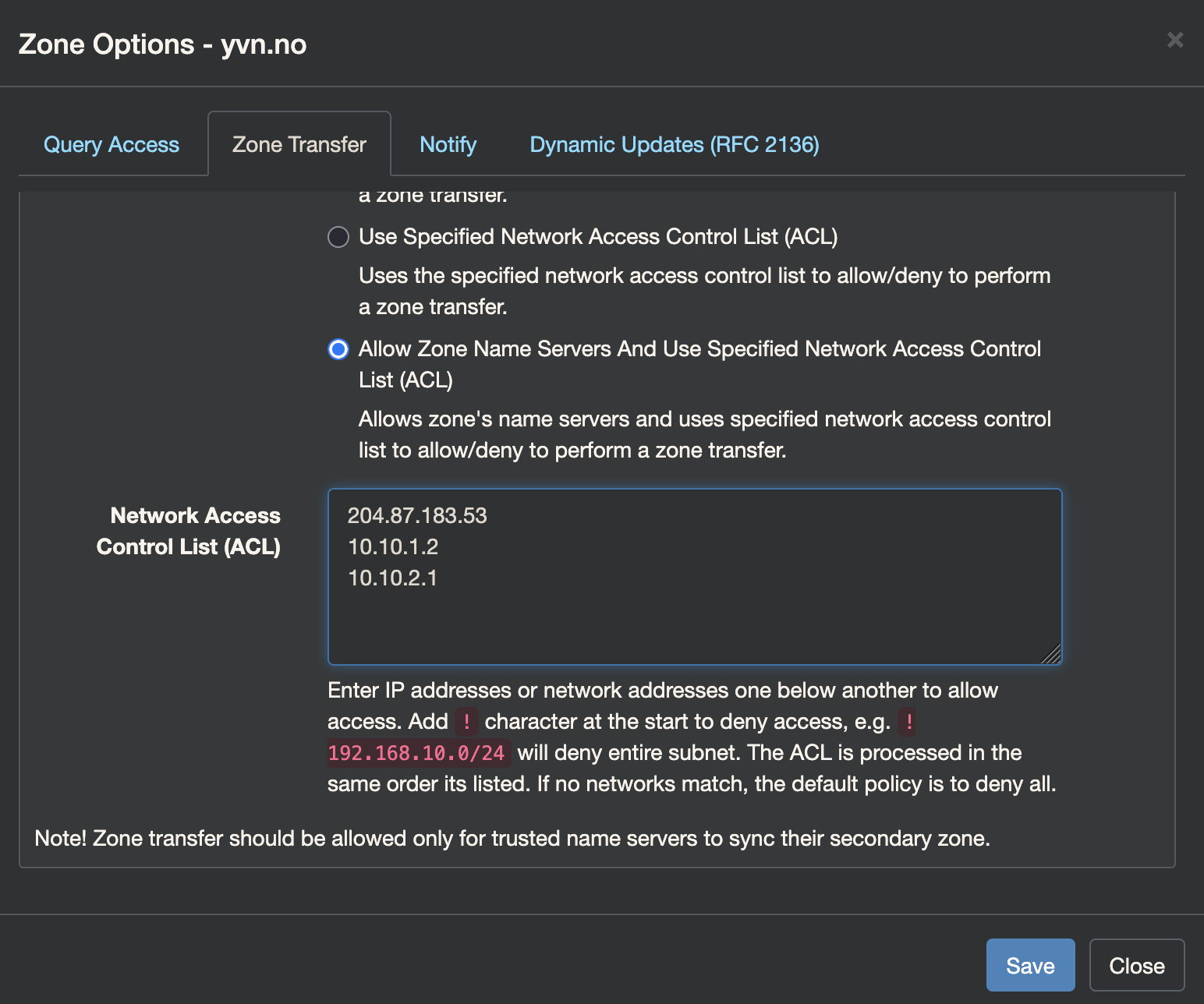
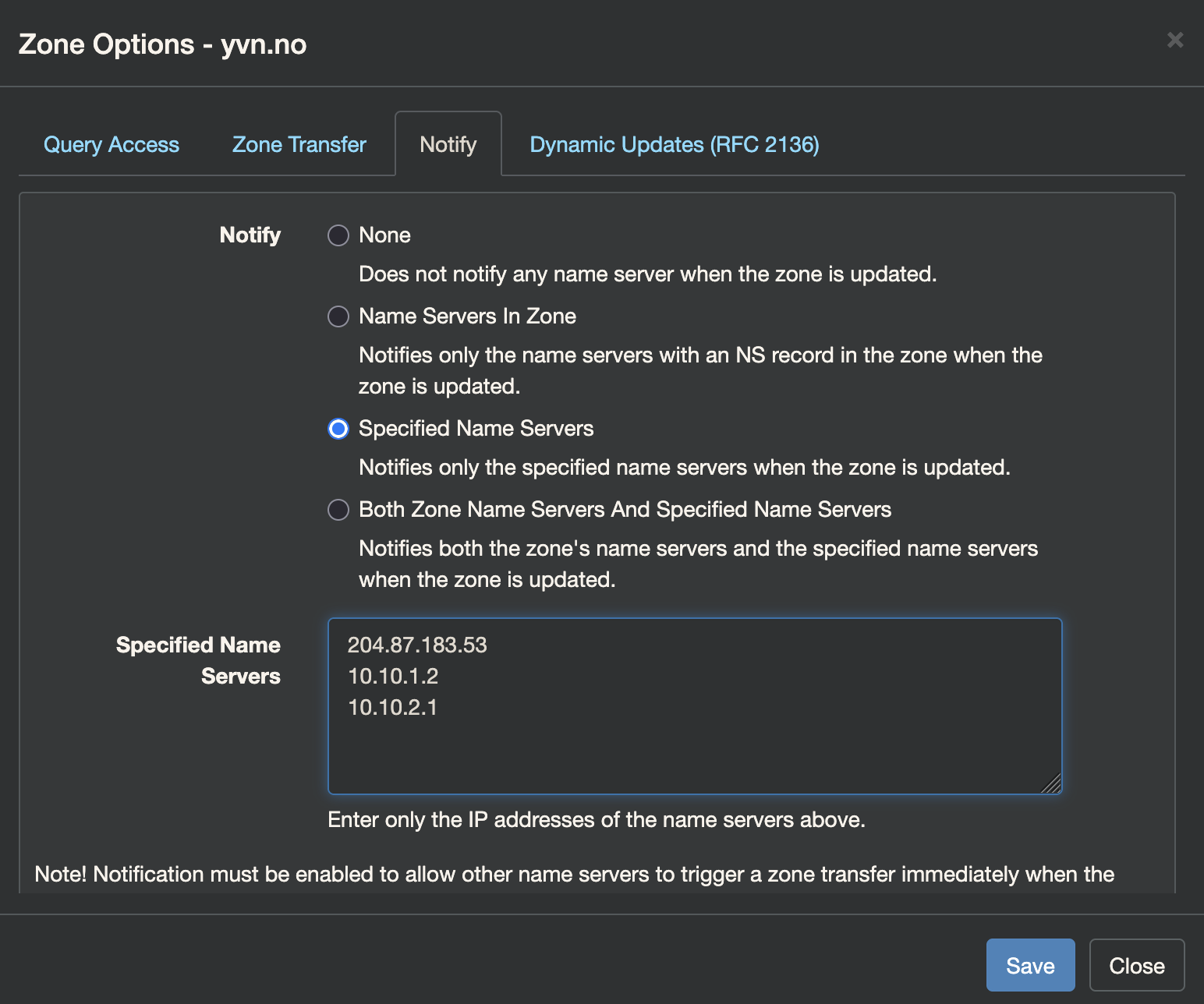
(The 204.87.183.53 IP is explained in the next section)
At both site A and B I have a ddns client running2 that makes sure to send updates to my primary name server at site A if an IP has changed. The double Wireguard tunnels ensures there is a path for that data to first get sent from the ddns client to the primary name server, and then on to the secondary no matter which IP has changed.
The result is that even if an IP changes and that DNS server is unreachable, the other server will always have updated records with the correct information. Thus enabling “self healing”.
The Tertiery resolver™
Into the mix I have also thrown in a secondary secondary - or tertiary if you will - name server. That is more of a hedge against my own fuckups than anything else. It ensures that should I take down both site A and B at the same time and make them unreachable there is still a way to query my domain for things like MX records so that email can be delivered.
For this role I picked NS-global. It’s a cool, free service providing secondary name servers. It just does what it says on the tin.
There are some downsides. The big one is that NS-global expects a static IP for the primary which it picks out from the domains SOA records. That makes a lot of sense but it does mean that if my site A IP changes I will have to resubmit my domain manually. Considering this hasn’t happened in close to three years (yes, my “dynamic” IP is pretty sticky) I’ve weighed the chance of me fucking up to be higher than the problems caused by this having to be a manual step before everything is back in sync.
As I evaluate the stability of my setup, I’ll revisit whether this third party service is actually needed. But for now it’s been working great. It certainly is something to look into if you don’t have your own candidate for a site B secondary name server location.
Caveats of Glue records
DNS is recursive. That means when looking up devblog.yvn.no.3 a DNS client (with no cached records) will ask one of the 13 root servers (these have hard coded IPs on most systems) where it can find the name servers (authoritative DNS servers) for the no TLD. These are managed by Norid which is the entity managing the Norwegian TLDs. The results are at the time of writing:
;; AUTHORITY SECTION:
no.                     172800  IN      NS      z.nic.no.
no.                     172800  IN      NS      njet.norid.no.
no.                     172800  IN      NS      x.nic.no.
no.                     172800  IN      NS      not.norid.no.
no.                     172800  IN      NS      y.nic.no.
no.                     172800  IN      NS      i.nic.no.
and then it’ll ask one of those what the name servers for yvn.no. are etc. until it has found where to ask for and resolved the IP address of devblog.yvn.no.. If the name servers are pointed to with an A record on the domain itself (ie. ns1.yvn.no) then the the Norid name servers would have to provide the IP of ns1.yvn.no as part of the response as to avoid an unsolvable recursion (I can’t ask ns1.yvn.no for where ns1.yvn.no is). This is known as a glue record.
I have worked around needing glue records by jugling a few domains I own and having them provide NS duties for each other. This is because glue records tend to have a longer TTL (time to live) than what I configure myself so I figured this will help “rebalance” quicker after a DNS change but I’m not too confident. Honestly, I’m still kind of waiting for this one to bite me. If you know something I should know regarding this - please do reach out!
In summary
I started writing out this post well over a month ago so I appologize if some sections feel somewhat incohererent. I think I touched upon the important parts of the setup without spiraling too much into the depths of trying to explain DNS to a level I perhaps do not understand it myself, or getting too hung up into the stack used and distract from the main points.
It’s not DNS
There’s no way it’s DNS
It was DNS
DNS can be a bit daunting but it is a fun fundamental part of the Internet to learn about. Cloudflare hosting my authoritative name servers was also one of the last third-party single points of failure in my setup so that was neat to get away from.
As always (and more than usual) I’m grateful for any feedback improving this content. It’s written mostly for myself, but I’ve found quite a bit of fun in having others get use out of these posts.
Sources and inspiration
This post was partly inspired by this one at linderud.dev.
-
Since writing this section I believe there’s been at least one post that was somewhat torn to shreds. ↩︎
-
Technitium supports DDNS clients adhering to RFC2136. There are multiple out there, although I ended up writing my own script with some added notifications and such. I’ll get a post up about this sometime. ↩︎
-
fun fact, the appended
.is not a typo. A fully qualified domain name should have a trailing . which isn’t really trailing as the root domain is null. Turns out we’re being utter savages just writing partially qualified domain names all day long in our browser! ↩︎
Related Articles
- Publishing PGP Keys With WKD
- Sending Mail From Servers
- Syncing Kobo and Calibre Web
- Replacing Maps Timeline With Owntracks
- State of De-Googling Part 2
- State of De-Googling
- Baikal CalDAV Hosting
- Ubuntu 24.04 Docker Watchtower Problems
- ZFS Encrypted Backups
- Moving From Philips Hue Hub to Home Assistant Zigbee
- Using Stow and Git for Config Files
- Deploy Your Applications With Watchtower
- Block Paths With Traefik
- Digging Through Internet History