Notes on IPv6
By hernil
So due to a few reasons IPv6 ended up on my radar again recently and I decided to take a new look into it. Last time I asked my ISP (NextGenTel) they said that they could enable it if I plugged in their box. I did not want to plug in their box and left it at that.
This time however I wanted to at least try!
Enabling IPv6
First step was to enable IPv6 in my router/gateway. My very modest network is Ubiquity hardware in the Unifi lineup as I have had decent experience with exposing power user features of networking to someone that is not a network engineer. They are not without their critics out there, including for less than stellar support for IPv6 but they have not been terrible enough for me to consider replacing my hardware.
No trace of documentation at NextGenTel
The UI of my Unifi gateway exposes the following settings1:
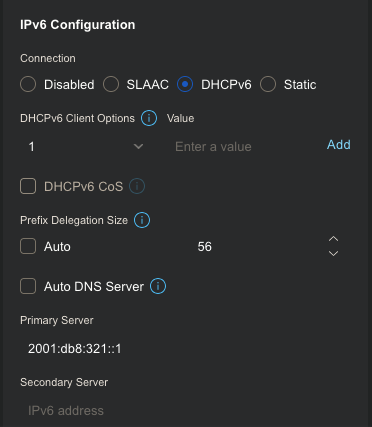
Note: Auto DNS server could probably have been kept checked and in retrospect there’s a good chance that Prefix Delegation Size could’ve as well.
For someone having never touched IPv6 my first instinct was to research wether my ISP says anything about configuring it. The only mention of IPv6 on their site refers to two router product pages where it simply says they support it. Great …
Just ask nicely
After some reading and looking around the concensus seems to be that non shitty ISPs delegate a so called /56 prefix or larger (larger means smaller number). So thinking that the smallest allowed to not be shit was a fairly probable middle ground for NextGenTel2 I decided to try it. Setting it and applying it did not do anything at first glance, but a reboot of the gateway and I seemed to have an actual IPv6 address.
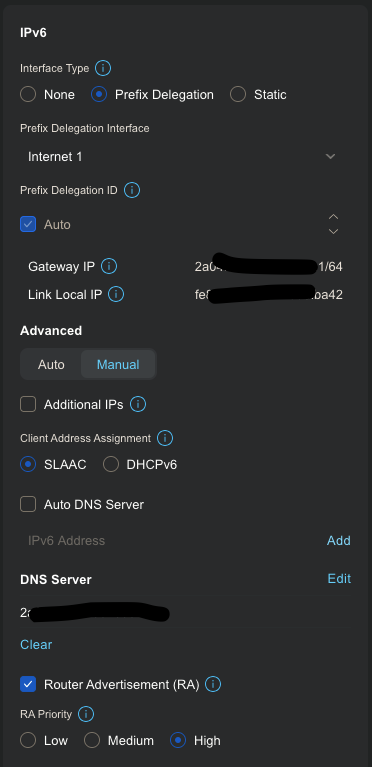
I rounded it all off by enabling IPv6 on my home network.
About prefix delegation and SLAAC
Short sidetrack to get my notes on Prefix Delegation and SLAAC in somewhere.
In IPv6 all vlans or subnets - or in other words the smallest network size you want to assign is a so called /64. This is because SLAAC - which is a way for clients to auto-assign and manage their own IPs as far as I understand - assume at least that much address space. Using SLAAC apparently greatly simplifies your network setup. It also seems that Android devices more or less require it for proper IPv6 function.
This means that if your home network wants more than one vlan, like if you have a guest network or a server doing VPN duty, then you want at something like a /56 prefix giving you a total of 256 /64 networks to play around with.
Did I mention that the 64 in a /64 is the number of bits given up to the prefix? That means as far as I understand that you have used the first half of the 128 bits in an address and you still have 2^64 number of addresses left for your network. Remember the whole of IPv4 address space is 2^32. IPv6s address space is pretty staggering.
I asked, but what did I get?
Okay. I asked for a /56 and as far as I can understand I got it. Now what does this mean? Where are my addresses and how do I use them?
In retrospect I think that Unifi assigned the first available /64 prefix (or subnet? I honestly haven’t verified if these two concepts are somewhat interchangable). What in the end let me discover where my subnet started was checking a log file in my gateway.
root@Next-GenerationGatewayLite:~# tail -f /var/log/wan-diag-dhcpv6.log
2026-06-01T14:22:14+02:00 Next-GenerationGatewayLite odhcp6c[1895]: 2001:db8:321::/56 preferred 7200 valid 14400
From here I used a calculator to find what addresses where available to me.
As mentioned, the first /64 was assigned to my LAN. I now have 253 left to do as I wish with.
One thing I did was get my existing Wireguard setup compatible with IPv6 but that will be for another post.
Firewall vs NAT
There are a few things that change when you think about IPv6 vs IPv4. One of them is that the concept of NAT (Network Address Translation) is meaningless. NAT typically (for a home user) happens when traffic outside the home needs to cross into the home. Because many LAN networks in the world use the same addresses (like 192.168.0.X/24 - this is by design) the router has to masquerade the traffic as only originating from itself. Keeping track of connections and translating return traffic back to its intented recipient on the LAN. The short supply of addresses in IPv4 has forced some ISPs to add an additional layer of NAT known as CGNAT (Carrier Grade NAT). Meaning that traffic from you device is modified and faked two times each way before reaching a destination on the Internet. This adds complexity (although many now see this as familiar and normal) and also some latency as there is more computation done.
With IPv6 there is no longer any reason to do things such as NAT. The address space is so huge that there is more than enough to go around for every device on the planet (at least for now).
Some people see NAT as a simple way of thinking of and separating “the wild west of the Internet” and “home”. Feeling safer behind NAT than with publically routable addresses. The common reccomendation is to simply leave that way of thinking behind. Default IPv6 setups should configure firewalls to behave much the same way as NAT did, blocking the Internet from knocking on your device unless spesifically allowed through.
But do double check of course!
Conclusion
It’s a bit early to conclude but I do feel like I’ve learned a lot the past few days. There are some tools and ways of thinking that have to shift somewhat but I do feel that the voices saying that IPv6 in some ways is simpler than some of the weirdness we have with IPv4 might have a point.
What is definitely true is that enabling IPv6 was easier and less disrupting than I thought. I did it for a second site (where the Unifi Dream Machine Pro actually prompted me) a few days later and doing DHCPv6 upstream, and SLAAC for the LAN - leaving the rest dialed to default Just Worked™.
I suggest looking into IPv6 if you think it is an option for your connections. It is not much work for defaults, and if you want there are things to learn and take advantage of. I also definitely see it as one of many steps towards keeping the Internet decentralized and available for everyone. Taking power away from tech giants hoarding the remaining IPv4 addresses.
Oh! And btw. This site is available on IPv6 now :-)
Related Articles
- Disable systemd stub resolver on Ubuntu
- Self Hosted DNS with a twist
- Sending Mail From Servers
- Syncing Kobo and Calibre Web
- Replacing Maps Timeline With Owntracks
- State of De-Googling Part 2
- State of De-Googling
- Baikal CalDAV Hosting
- Ubuntu 24.04 Docker Watchtower Problems
- ZFS Encrypted Backups
- Moving From Philips Hue Hub to Home Assistant Zigbee
- Using Stow and Git for Config Files
- Deploy Your Applications With Watchtower
- Block Paths With Traefik